Most AI assistants are excellent at the moment right before the work starts. You describe a problem, you get a well-organized answer, and then you decide what to do next. The thinking is good. The doing is still yours.
That gap is why we built Zero the way we did, and it is the honest answer to the question we get most often: how is this different from Claude?
Most people asking that are really looking for a Claude alternative for teams, so that is the comparison this post makes: Zero against Claude Tag, Claude Code, and Claude Cowork.
It is not that one model is smarter. Zero runs on the same frontier models you already trust, Anthropic's included. The difference is what happens after the answer, and it shows up in five places: what Zero does on its own, what it hands back, how a team shares it, how many surfaces it lives on, and who picks the model.
Action mode, not thinking mode
One of our early users described it better than our own pitch did:
The clearest difference I noticed is that Zero starts in action mode by default. Claude stays in thinking mode until you explicitly push it toward execution. With Zero I didn't have to make that shift and it just moved.
That is a description of a product shape, not a feature. Zero is not a chat box that can also call tools. It is a cloud agent that takes the job, works while you do something else, and hands back something finished.
What Zero actually does
Five capability areas cover most of it.
- Deep research. Systematically investigate a topic, product, market, company, customer signal, or codebase and produce a structured brief with findings, risks, sources, and next steps.
- Artifact generation. Turn rough ideas, files, notes, and research into finished decks, reports, websites, and microsites.
- Lightweight coding. Read a repo and explain its architecture, debug an issue, ship a small feature or UI change, write scripts and data tools, open pull requests, and run targeted checks.
- Workflow automation. Create or remix reusable workflows across connected tools, from Gmail triage to GitHub PR flows to product-health digests, across 200+ tools.
- Recurring automation. Run on a schedule or an event trigger. Not one-off answers, but ongoing responsibilities.
In one line: Zero is not a chatbot. It is a cloud-based AI employee that does the work itself and stays on the clock.
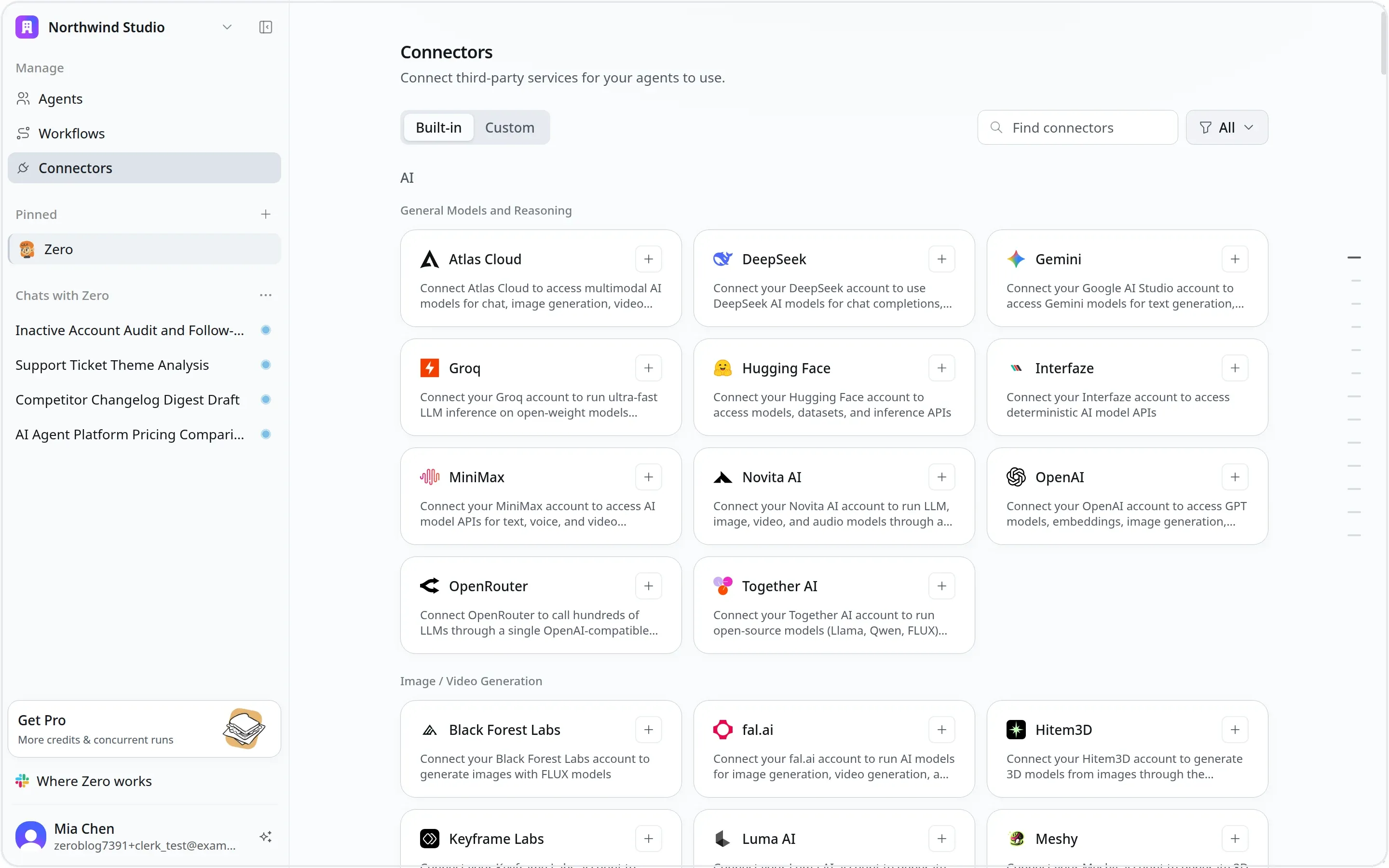
Zero's built-in connector catalog. Each connection is authorized per app and per action, so an agent gets the access a specific job needs and nothing beyond it.
What it hands back
Zero produces deliverables you can use, not written advice about how to produce them.
Research and decision-making. Structured research briefs, competitor, market and pricing analysis, company background checks, pre-sales meeting research, and messy context distilled into a decision-ready executive summary.
Content and presentation. Launch, investor, business-review and research decks. Website reports, static microsites, landing pages, and portfolio sites, hostable at a public URL. Data reports, company briefs, product updates.
Engineering and automation. Architecture explainers, bug localization and fixes, small features and UI work, pull requests. Scripts, data transforms, one-off tools. Recurring jobs that post Slack reports, update Notion, log rows to Google Sheets, and send daily digests.
Generated assets. Images, video, voice and audio, presentations, plus connector-backed text, code, documents, and websites.
The scenarios where the difference is largest
These are the "set it once, keep producing" jobs. They are where Zero separates from an ordinary chat assistant, because none of them involve a person waiting at a prompt.
- On-call for engineering. Scan Sentry hourly, flag high-impact issues, open a GitHub issue or a focused pull request, report to Slack.
- PR auto-merge. Watch pull requests labeled ready-to-merge, wait for CI, merge when it is safe, notify Slack.
- Company brief. Pull daily product, revenue, support, and engineering signals into one brief.
- Sales and inbox ops. Triage Gmail, draft replies, enrich leads, write structured rows to Google Sheets.
- Monitoring and intel. Track deployments, metrics, alerts, customer feedback, or competitor changes on a schedule.
- One-off deep work. Research a market or competitor, build an investor deck, or trace a production bug and ship a fix PR.
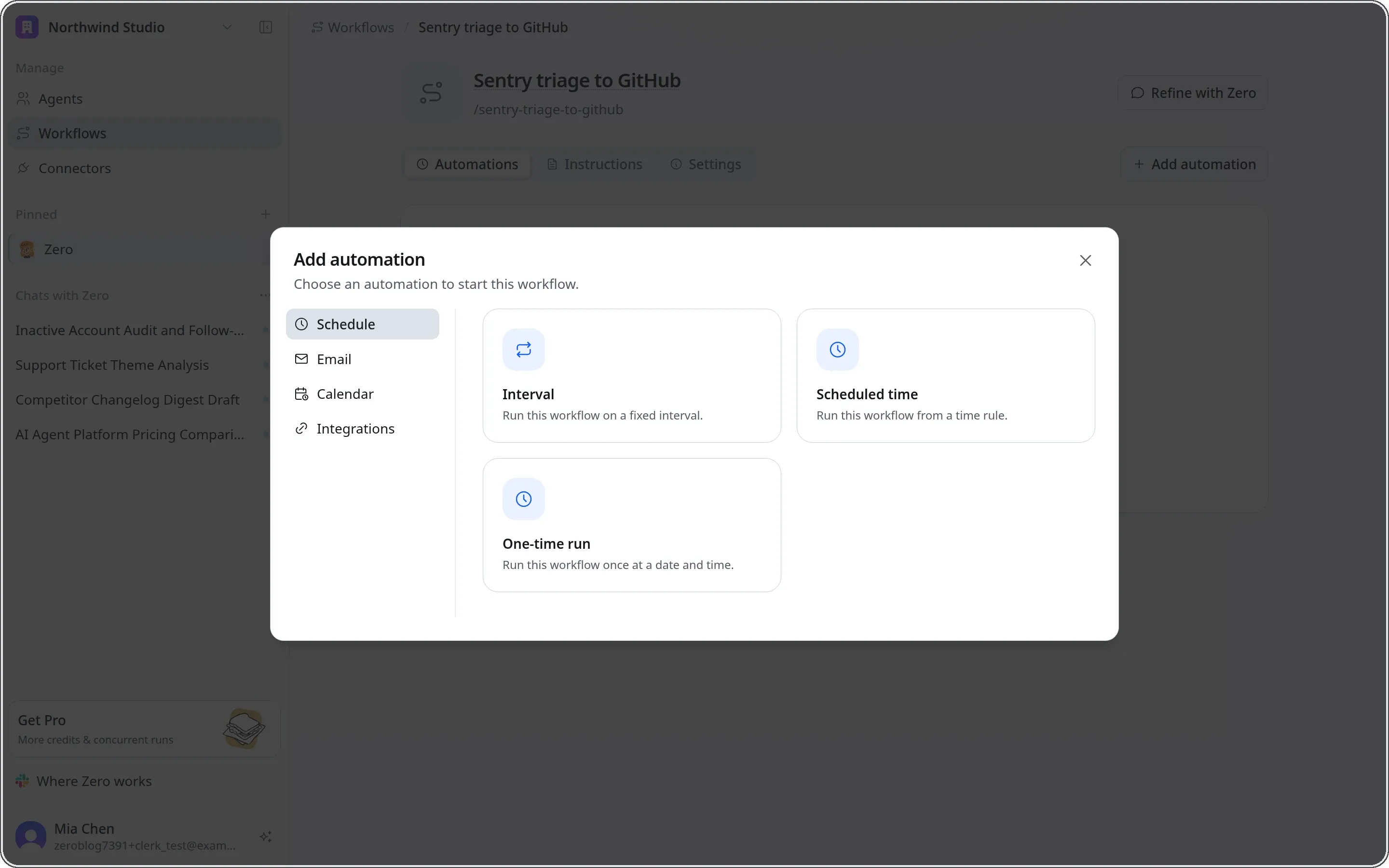
This is where a workflow stops being a one-off. Attach a schedule, an inbound email, a calendar event, or an integration event, and the job runs without anyone opening the app.
The edge is four things arriving as one platform
No single feature in that list is unique. What is hard to assemble is having all four of these at once.
It works for you in the cloud. Zero runs in the cloud, handles many tasks at once, and keeps going after you close your laptop. No local setup, no file sync, no requirement to stay online. Each run happens in an isolated microVM that is destroyed when it finishes.
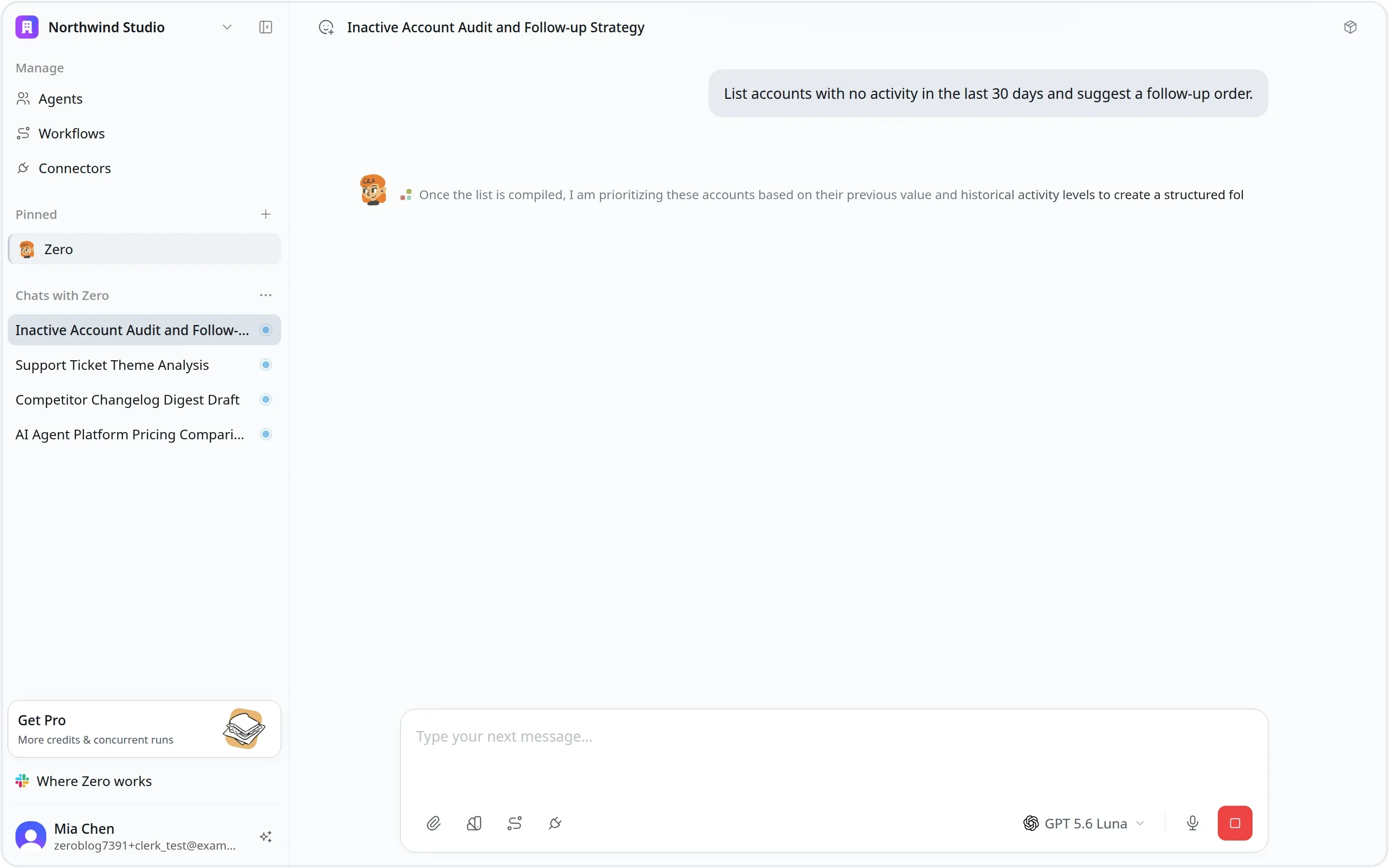
Four jobs in flight at once. Every one of them executes on Zero's servers, so they keep going when the laptop closes and they do not slow each other down.
It is built for a team, and it compounds. Zero is a shared space, not a single-player tool. The skills, workflows, and outputs a team builds get reused across the org, so one person's setup becomes another person's starting point.
Complex work becomes reusable automation. Multi-step, cross-tool processes can be orchestrated and customized, then triggered again and again, and they stay as a team asset.
It is always on the strongest available model. Switch between flagship models freely, with no lock to a single vendor. Beyond the models, Firecrawl-backed web data, the X (Twitter) API, and image and video generation are built in.
The team layer is architecture, not a sharing button
Claude shares context, and it now shares Skills too. The more useful question is one level lower: how are the building blocks arranged for a group of people?
Shared agents, and more than one. A team can stand up several shared agents, each a permanent teammate the whole organization uses. One for marketing, one for support, whatever the org needs. You can also keep an agent private. Nobody has to build their own from scratch; you join and the shared agent is already there with its connected apps.
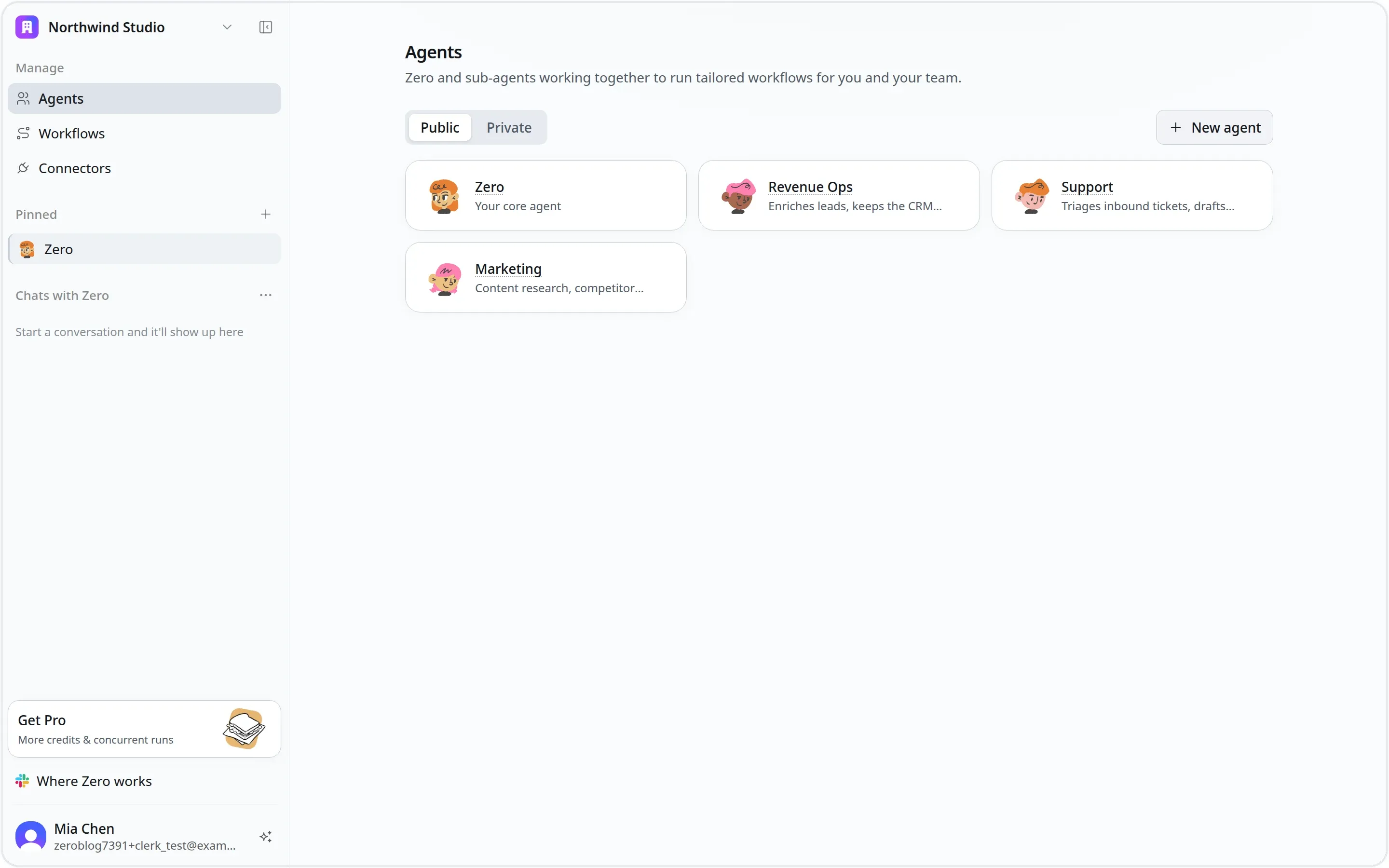
Four shared agents at the org level, each with its own role and connected apps. A new teammate sees them on day one instead of building their own.
Shared workflows. A workflow is a reusable job, the "what". One person writes it once and it is immediately in everyone's hands, ready to run, with nothing to copy and nothing to re-wire. Capability lives at the team level instead of inside one person's setup.
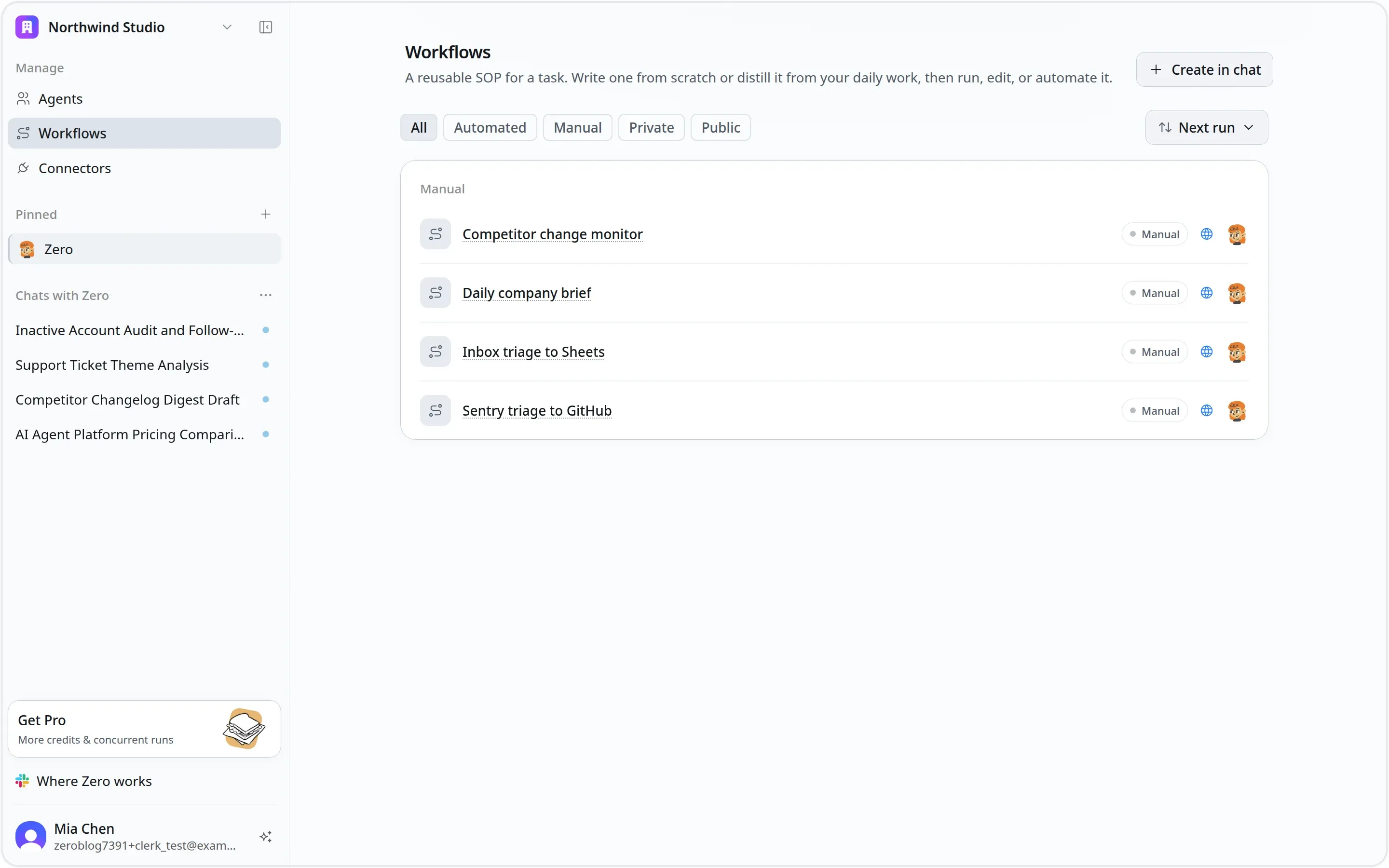
The workflows a team has accumulated. One person writes one, and it is immediately available to everyone, with nothing to copy or re-wire.
Personal automations. On top of those shared workflows, each person attaches their own triggers and schedules. Your automations run under your identity and your credentials, on the shared agent, tuned to your work, without touching anyone else's. Shared foundation, personal control.
Permission designed into each layer. Agents and workflows can be shared org-wide or kept private. Every connector sits behind a fine-grained firewall: access is granted per app and per action, read or write, allow or deny, and it can be time-boxed to an hour, a day, a week, or left standing. Credentials are injected at the network layer, so the agent uses a token it cannot read. Governance sits at the platform level while each member still configures exactly what their own work needs.
In place before you arrive. The shared agent, its connected apps, and the permission rules are already configured, so adopting a workflow is mostly just running it, and the output lands in the tools the team already uses.
Compare that with how the alternatives distribute work. Claude Code is a per-developer tool, shared through a git repo and config files. Cowork is explicitly your own personal Claude, where Skills and sub-agents are per-user. Claude Tag shares through Slack channels, with context built per channel and an Owner deciding which channels it works in.
None of them is missing a sharing feature. What is missing is a cross-tool workflow library that keeps accumulating value for the team.
One agent, not a product line
Claude's capability is split across separate products. Tag lives in Slack, Claude Code across the terminal, IDE and web, Cowork on the desktop with web and mobile in beta. Each has its own scope, its own memory, and its own interface. Work you do in one surface largely stays there, and so does the context you built getting there.
Zero is one agent that shows up in the channels a team already works in, starting with the web app and Slack. Same agent, same memory, same connected tools. Switching windows does not reset what it knows.
Model neutrality, and bringing your own subscription
Zero's model is switchable. Today that means the Claude family (Claude Fable 5 as the default, Claude Opus 5, Claude Opus 4.8, Claude Opus 4.7, Claude Opus 4.6, Claude Sonnet 5, Claude Sonnet 4.6) and the GPT family (GPT 5.6 Sol, GPT 5.6 Terra, GPT 5.6 Luna, GPT-5.5, GPT-5.4), with routing that can move between built-in models and your own key. Which of them a given workspace can reach is a workspace setting, so your picker may be shorter than a colleague's.
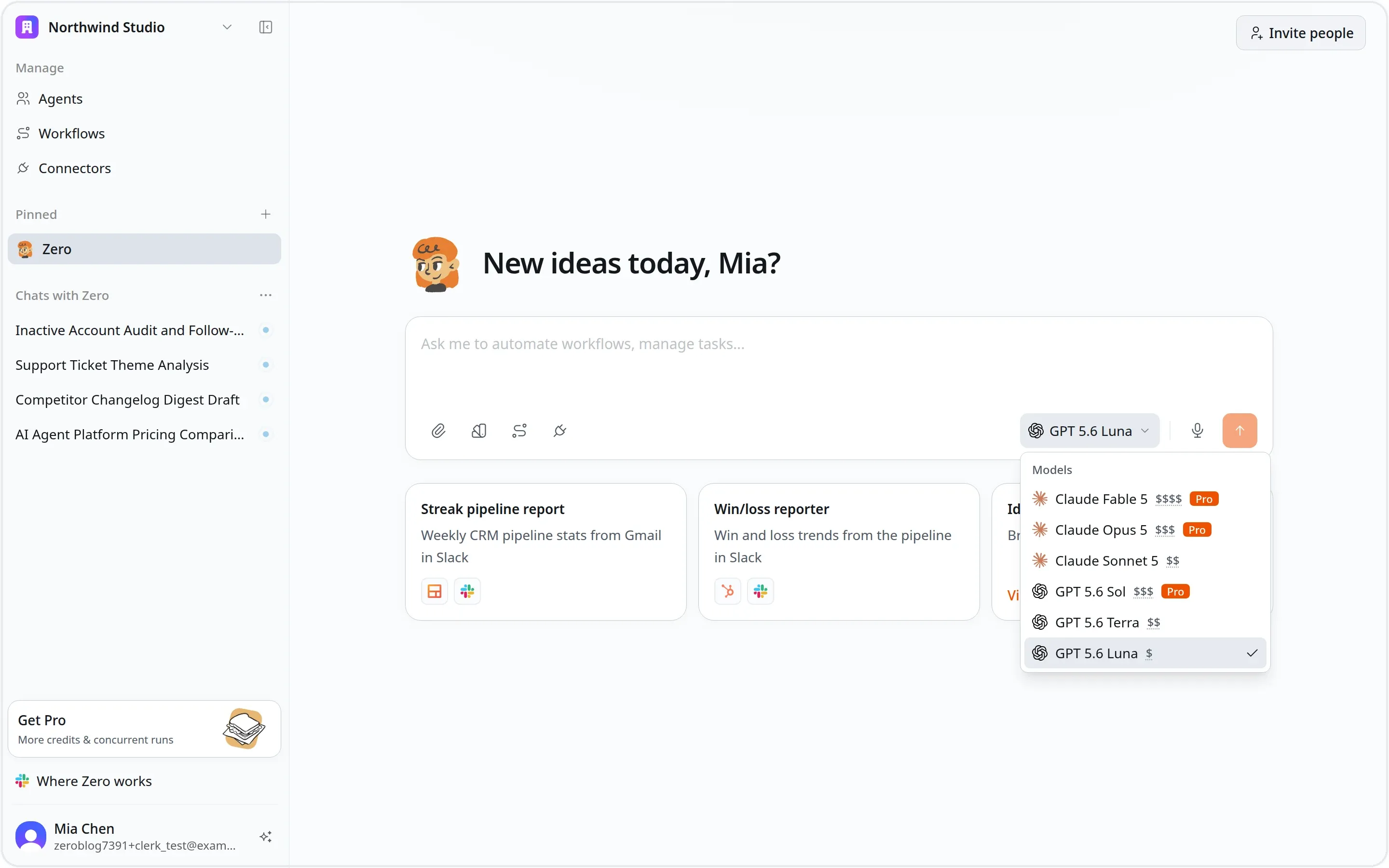
The model picker. Claude and GPT sit side by side with a relative cost tier, so which model runs a task is a decision you make per job rather than one the vendor makes for you.
Claude Tag runs on one fixed Claude model. Claude Code and Cowork run Anthropic models only. Codex runs GPT only. In each case the vendor's model strategy becomes your model strategy.
You can also bring your own Claude subscription and keep using Anthropic's most advanced models, accessed through Zero: a lower-noise interface that always executes in the cloud, so work continues after you close your laptop.
The point is not variety for its own sake. Price and capability differ sharply between providers, and the same task can cost several times more on one than another. When you choose per task, that spread becomes a decision you make instead of a rate you accept.
The full comparison
This is the complete matrix we maintain internally, published as-is. It was compiled from each vendor's own product, security, and pricing documentation, last re-checked against those sources on 2026-07-30. Competitors ship quickly, so treat it as a snapshot rather than a permanent state.
Zero vs the Claude product line
| Dimension | Zero | Claude Tag | Claude Code | Claude Cowork |
|---|---|---|---|---|
| Positioning | Cloud-computer general team AI agent | Team version of Claude inside Slack | Anthropic's agentic coding tool (terminal / IDE / headless) | Anthropic's general knowledge-work computer agent (>90% non-coding) |
| Primary surfaces | Web / Slack / Telegram / Phone | Slack today (@ / DM / assistant panel); Microsoft Teams announced as coming soon | Terminal (CLI) / IDE (VS Code, JetBrains) / desktop / web / headless (GitHub Action) | Desktop (mac / Win) + web + mobile (beta) |
| Cloud execution | Yes (isolated microVM, destroyed after each run) | Yes (Claude runs in the cloud) | Local by default; headless / cloud via GitHub Action & background agents (sandbox: network off, writes scoped to project) | Runs sessions remotely in the cloud (beta); continues after laptop closes; scheduled tasks run device-off |
| Connector breadth | 200+, per grant (credentials injected at network layer) | Whatever tools / data / repos you authorize, drawn from Claude's Connectors Directory — ~500+ MCP connectors (community-tracked, Jul 2026; mostly 3rd-party, some Anthropic-built) + custom remote MCP | MCP servers + Claude Connectors Directory (~500+) + GitHub; dev-stack oriented | Connectors + plugins + Claude Connectors Directory (~500+) + Computer Use / Chrome control |
| Scheduling / 24×7 | Recurring / event-triggered workflows are a core, mature feature: hourly Sentry checks, auto-merge watched PRs, daily briefs, Gmail triage — running 24×7 in the background | Standing instructions that run on a schedule (for example a weekly digest) or as long-running tasks, plus an ambient mode that watches channels and follows up unprompted | Routines run once configured, on a schedule, from an API call, or on an event; plus headless jobs via CLI + GitHub Actions and background subagents | Recurring / scheduled tasks (daily briefings, weekly reports); run with no device online |
| Coding depth | Strong | Strong | Strongest (Anthropic's dedicated coding agent) | Lightweight (Claude Code harness for general work; deep coding = Claude Code) |
| Memory / learning | Durable memory | Learns the company from its channels | CLAUDE.md + skills + subagents + hooks (layered, human-written, version-controlled) | Skills + connectors + sub-agents; account-synced sessions |
| Team sharing (instance) | Org-level single instance (not channel-scoped), team-shared; has a web agent-config page | Channel-level multiplayer sharing; Claude has its own identity | Per-developer (individual); shared via git repo + CLAUDE.md / plugins; team version = Claude Tag | Per-user personal agent ('just your own Claude'); Enterprise RBAC / spend limits |
| How teams use it | Connect Slack channels + org connectors + shared 24×7 workflows | @Claude in a channel; anyone can pick up others' conversation; ambient follow-up | Each dev runs it locally / headless; shares via repo, plugin marketplace, GitHub PRs | Individual delegation; bundle skills / connectors / subagents into role specialists; Enterprise controls |
| Team workflow accumulation | Reusable workflows / automations become shared org assets that compound across the team (core) | No team-workflow layer; work is organised per channel rather than as a reusable cross-tool workflow library | Skills / plugins shared via marketplace / git; dev & repo-scoped, not team business workflows | Skills / sub-agents are per-user; no team-shared compounding workflow library |
| Independent identity | Yes (Agent ID is its own identity; credentials injected at network layer, the agent can't read the token) | Yes (its own account + every credential use logged) | Runs as the developer (their account / connectors); GitHub Action runs as a bot | Runs as the user (their account + allowed folders / tools) |
| Permissions / audit | Per-connector × per-endpoint permission firewall + full audit log | Three-tier permissions + full audit log | Permission modes + allowlists + hooks + managed settings; Auto Mode classifier | User approves sensitive actions (plan-approval); Enterprise RBAC + usage analytics + OpenTelemetry |
| Security & compliance | Isolated execution + credentials never exposed + audit | Enterprise identity + audit | Sandbox (network off by default, writes scoped to project) + checkpoints + credential blocking | Human-in-the-loop approvals + folder / tool scoping; warns of destructive actions & prompt-injection risk |
| Model strategy | Model-neutral, multi-provider | Locked to a single Claude model | Claude only — Sonnet 5 default, Opus 5, Haiku (switchable) | Claude only (Anthropic models) |
| Pricing | Credits-based | Bundled with Enterprise / Team | Bundled with Claude Pro / Max / Team / Enterprise or API tokens | Bundled with Claude Pro ($20)/Max / Team / Enterprise |
| Multimodal generation | Yes (image / video / voice / deck generation) | No (no image, video or audio generation) | No (coding-focused; can read images) | Creates documents / decks; image / video generation not a focus |
| Memory architecture | Durable memory (org-level persistent memory) | Builds context from the channels it works in | CLAUDE.md / skills / subagents (repo & user level, human-written, version-controlled) | Skills / sub-agents + sessions & files saved to your Claude account |
| Connector setup | Users or org OAuth-authorize connectors and grant them to the agent; then fine-grained allow via per-connector × per-endpoint firewall, time-boxed 1h / 24h / 7d / always | A Primary Owner or Owner provisions Claude's identity, connects the org's tools and picks which channels it can work in; regular members can't self-serve, but they also don't configure anything | Developer self-configures MCP servers (claude mcp login) + settings.json; per-user | User connects folders / apps / connectors + plugins and approves access |
| Setup barrier (self-serve ↔ admin) | User self-serve + per-endpoint firewall / time-boxing (self-serve and control at once) | Owner configures identity, tools and channels; not self-serve for members | Developer self-serve (low for devs; CLI / config) | User self-serve (non-technical focus, low barrier) |
| Own brand / white-label | Agent name / avatar customizable | Appears as 'Claude', not your brand | Appears as Claude Code / the developer | Appears as Claude |
| Deployment / hosting | vm0-hosted cloud (microVM isolation); BYOC not emphasized | Anthropic-hosted only | Local + Anthropic cloud (headless / Action); Enterprise managed settings | Anthropic-hosted (local desktop files + remote cloud sessions); Enterprise |
| Governance summary | Org-level shared instance + own identity + per-endpoint firewall → shared yet finely governable and auditable | Shared entry point (channel) + own identity / audit → shared but auditable | Per-developer coding agent; identity = the dev; governance via Enterprise managed settings | Personal computer-agent; runs as the user with approvals; Enterprise RBAC / spend / analytics |
Zero vs the other team agents
| Dimension | Zero | Viktor | Codex | ChatGPT Work |
|---|---|---|---|---|
| Positioning | Cloud-computer general team AI agent | AI employee inside Slack / Teams | Cross-surface agentic coding agent | Enterprise knowledge-work AI assistant (inside ChatGPT) |
| Primary surfaces | Web / Slack / Telegram / Phone | Slack + Teams only | ChatGPT (web / desktop) / IDE / terminal (CLI) / cloud | Web / Desktop / Mobile app (+ Slack / Teams connectors) |
| Cloud execution | Yes (isolated microVM, destroyed after each run) | Yes (own cloud computer to write & run code) | Yes (Codex Cloud clones the repo & runs tests; sandbox network off by default, connectors / write-APIs need allowlist + approval) | Yes (OpenAI cloud; code-interpreter sandbox) |
| Connector breadth | 200+, per grant (credentials injected at network layer) | 3,200+, can build custom integrations | MCP + GitHub PR, dev-stack oriented | Dozens of built-in / partner apps (Drive / SharePoint / Gmail / Outlook / Teams / GitHub / Notion / HubSpot / Stripe…, write-capable) + custom MCP connectors (no official total, effectively unlimited; ~274 MCPs in a 3rd-party directory) |
| Scheduling / 24×7 | Recurring / event-triggered workflows are a core, mature feature: hourly Sentry checks, auto-merge watched PRs, daily briefs, Gmail triage — running 24×7 in the background | Built-in scheduling / loops: set once and it runs on a fixed cadence (e.g., a weekly report every Mon 8am), no manual trigger | Scheduled + trigger tasks are live, with cron / RRULE custom cadence; managed in ChatGPT web / desktop app (Codex CLI has no scheduling UI) | Scheduled tasks + web / connector-change monitoring, managed from the Scheduled sidebar; in-chat follow-up supports minute-based intervals |
| Coding depth | Strong | Lightweight | Deepest (multi-agent + worktrees) | Lightweight (analysis / code-interpreter; deep coding handed to Codex) |
| Memory / learning | Durable memory | 'Skills' internal notes | AGENTS.md + Skills (fairly static) | Memory + Company knowledge |
| Team sharing (instance) | Org-level single instance (not channel-scoped), team-shared; has a web agent-config page | Workspace-level single instance, shared by the whole team (no per-user isolation) | No shared instance; each developer uses their own, per seat | Workspace / per-seat; admin-managed, each user's own account |
| How teams use it | Connect Slack channels + org connectors + shared 24×7 workflows | Anyone @Viktor to assign work; results posted back | GitHub as the collaboration surface: automatic PR review / @codex fix | Shared GPTs / Projects + apps; each user collaborates from their own account |
| Team workflow accumulation | Reusable workflows / automations become shared org assets that compound across the team (core) | 'Skills' accumulate at workspace level, team-shared (closest to Zero on this dimension) | AGENTS.md / Skills shared via git repo; dev-scoped, not team business workflows | Shared GPTs / Projects + scheduled tasks, but per-app; no compounding cross-tool workflow library |
| Independent identity | Yes (Agent ID is its own identity; credentials injected at network layer, the agent can't read the token) | No (shared / borrowed team OAuth token) | Weak (borrows the developer's session; appears as @codex bot on GitHub) | Each user's own account (OAuth / SSO); company knowledge scoped to their permissions |
| Permissions / audit | Per-connector × per-endpoint permission firewall + full audit log | No RBAC, shared token (on roadmap) | OS-kernel sandbox isolation | RBAC + SSO / SCIM + Compliance Logs / audit events |
| Security & compliance | Isolated execution + credentials never exposed + audit | No RBAC | Kernel-level sandbox | SOC 2, ISO 27001 / 17 / 18 / 701; E2E encryption, data residency, CMEK |
| Model strategy | Model-neutral, multi-provider | Opaque | OpenAI models only (its own frontier coding models) | Locked to OpenAI (GPT-5.x) |
| Pricing | Credits-based | Free + $100, then from $50 / mo | Bundled with ChatGPT subscription / API key | Bundled with ChatGPT Business / Enterprise / Edu seats |
| Multimodal generation | Yes (image / video / voice / deck generation) | Not stated (focused on data / reports / code / marketing) | No (coding-focused) | Yes (image generation; video via Sora) |
| Memory architecture | Durable memory (org-level persistent memory) | 'Skills' internal notes (workspace-level shared) | AGENTS.md / Skills (repo-level, human-written, version-controlled) | Personal memory + workspace company knowledge (not wiki-style) |
| Connector setup | Users or org OAuth-authorize connectors and grant them to the agent; then fine-grained allow via per-connector × per-endpoint firewall, time-boxed 1h / 24h / 7d / always | Any member self-serves a connection once; the whole team then shares that grant (shared OAuth token, no per-user isolation), no admin needed | Developers connect GitHub and configure MCP servers (allowlisted) at org / repo level; connector / write-API calls still need approval — not self-serve | Admins enable each app in the console and set RBAC / group permissions (can require SSO / SCIM); users then OAuth-connect their own accounts (company knowledge follows their permissions) |
| Setup barrier (self-serve ↔ admin) | User self-serve + per-endpoint firewall / time-boxing (self-serve and control at once) | User self-serve (connect once, shared team-wide; lowest barrier) | Developer configures GitHub / MCP + approval; high barrier | Admin enables apps first + users OAuth their own (semi-self-serve) |
| Own brand / white-label | Agent name / avatar customizable | Appears as 'Viktor' | Appears as @codex | Appears as ChatGPT |
| Deployment / hosting | vm0-hosted cloud (microVM isolation); BYOC not emphasized | Zeta Labs SaaS-hosted; no own-cloud | OpenAI-hosted; Enterprise has SSO / admin | OpenAI-hosted; Enterprise SSO / SCIM / data-residency / CMEK |
| Governance summary | Org-level shared instance + own identity + per-endpoint firewall → shared yet finely governable and auditable | Shared instance + shared identity / token → no per-person accountability | No shared instance; weak identity (borrows the user) → relies on the GitHub PR trail | Per-seat enterprise assistant + individual accounts + admin / RBAC / audit |
Who this is for
Zero's primary users are not defined by demographics, and not by being "tech-driven." They are people and organizations whose ambition outruns their own hands, who want to multiply their output with AI. They already use SaaS and AI tools every day. What they want are practical, reusable workflows that pay off immediately, not another tool where they have to build the plumbing themselves.
The common thread is that their scope of responsibility exceeds their current headcount and expertise. The current core is solo founders and founder-led agencies. Over time it extends to innovation leads and AI-transformation owners inside larger companies.
- Marketers. Content and competitor research, reports and decks, channel monitoring, everyday marketing automation.
- Founders. Company briefs, decision research, turning a small headcount into an always-on team.
- Agencies. Reusable workflows become client-facing delivery capacity, one process serving many clients.
- Freelancers. Run as a one-person team. Hand repetitive work to Zero and focus on high-value output.
- Product teams. Product health, user and competitor signals, cross-tool collaboration and logging.
- Business professionals. Sales, ops, and support roles automating repetitive, cross-system work.
They are not necessarily technical. They are happy to hand repetitive, cross-system work to AI, and they want workflows that land in the first week.
The one-line version
Others give you a smarter chat box. Zero gives you a cloud work platform that is always on, parallel, collaborative, orchestratable, and free to reach for the best model available.
Same frontier models, delivered differently. Team-native, executed in the cloud, and unified where the alternatives are split apart.
Frequently asked questions
Is Zero a Claude alternative?
Partly. It is a Claude alternative for teams, but a different category of product: a cloud agent platform rather than an assistant you chat with. It can run Claude models, so it is less a replacement for the model and more a replacement for the surface you use it through.
Can I keep using Claude models in Zero?
Yes. The Claude family is in the model picker — Fable 5 as the default, plus Opus 5, Opus 4.8, Opus 4.7, Opus 4.6, Sonnet 5 and Sonnet 4.6 — and you can route through your own key if your team already pays a provider directly. You can also switch a specific task to a GPT model.
What is the difference between a workflow and an automation?
A workflow is the reusable job, the "what", and it is shared with the team. An automation is a trigger or schedule you attach to a workflow, and it belongs to you. That split is what lets one person's work become everyone's capability while each member keeps their own runs, credentials, and cadence.
Does my whole team share one agent?
You can have several shared agents visible to the whole organization, plus private ones. A shared agent already has its connected apps and permission rules in place, so a new member can run a team workflow without setting anything up.
How are permissions controlled if the agent is shared?
Every connector sits behind a per-app, per-action firewall. Access is granted as read or write, allow or deny, and can be time-boxed to an hour, a day, a week, or left standing. Credentials are injected at the network layer, so the agent uses a token it cannot read, and every use is auditable.
Can Zero keep working after I close my laptop?
Yes. Every run happens in the cloud in an isolated environment that is destroyed when the run ends, and scheduled or event-triggered workflows run whether or not you are online.